Locations
In order to get alerts for spawns within a certain distance of you (see Setting Up Location Alerts), you must set up locations. You can store a list of locations to switch between (add and remove), but may only have one active location at a time (chosen by setting). You can switch your active location as you wish, but you must type the command; there is no tracking.
Viewing Locations
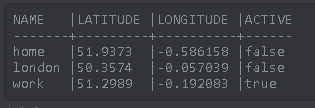
!location show
Shows a list of your saved locations, and shows which is active. It’s the go-to to see what’s going on with locations.
Adding/Removing Locations
!location add name=<name> coord=<coords>
For example !location add name=needle coord=51.5085,-0.1204
Adds a new location.
Note
<name>should be alphanumeric - spaces won’t be accepted.- The command is coord, not coords!
<coords>should be in decimal notation only (51.xxx..,-0.xxx..).- No spaces around the comma between coords, nor either side of any of the = in the command.
Warning
Even if you only add one location, it doesn’t automatically become active, you will need to set it active (see Setting/Unsetting Locations).
!location remove <name>
For example !location remove work. Removes a location by its name as stored at !location show.
!location remove all
Removes all stored locations; start afresh!
Setting/Unsetting Locations
!location set <name>
For example !location set work. Sets a location to active by its name as stored at !location show. All other locations become inactive.
!location mute
Sets all locations to inactive.